






Outlook4Gmail

Synchronisez vos calendriers Google et les contacts avec Outlook

A propos de Outlook4Gmail

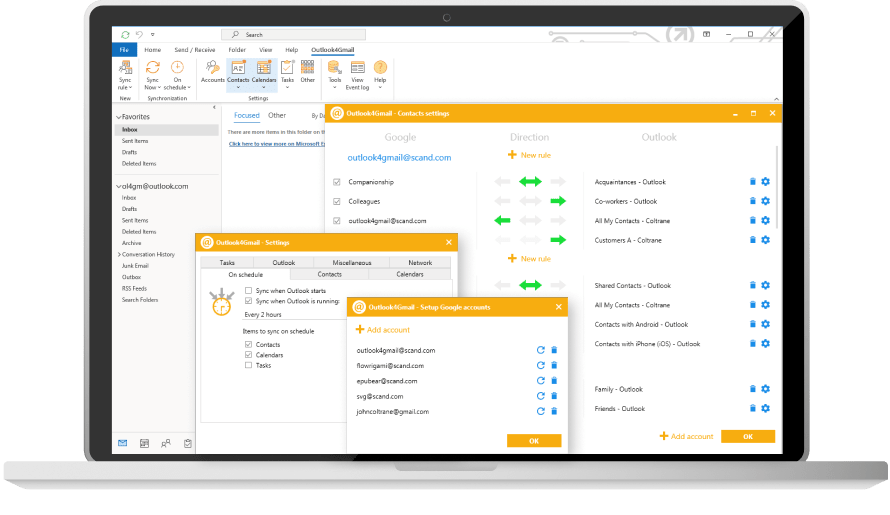
Outlook4Gmail est un complément Outlook qui vous aide à effectuer synchronisation des calendriers Google avec Outlook ainsi que synchroniser des contacts et des tâches. C’est un outil parfait pour les utilisateurs d’Outlook qui ont un ou plusieurs comptes Google.

Fonctions de base

  • Fournit des contacts automatisés, des calendriers et des tâches de synchronisation par un intervalle de temps particulier.

  • Prend en charge la synchronisation des contacts, des calendriers et des tâches à partir de plus d’un compte Google.

  • Établit une connexion sécurisée au cours de la synchronisation des éléments Outlook avec Google

  • Prévoit 3 modes de synchronisation: Outlook ⇒ Google, Outlook ⇔ Google, Outlook ⇐ Google

  • Syncronise une grande quantité de données reçues de vos comptes Outlook et Google

Synchronisation des contacts

Outlook4Gmail synchronise vos contacts au niveau le plus fiable en intégrant nom, entreprise, numéro de téléphone, email, adresse, date, message, photo de profil, catégorie et groupe Google. De plus, Outlook4Gmail offre une fonction d’élimination des doublons, la gestion des paramètres de langue, la sauvegarde automatique des données qui précède le processus de synchronisation.

Contacts syncing screen

Synchronisation des calendriers

La version TOUTES OPTIONS de Outlook4Gmail permet d’importer des évènements Outlook dans un calendrier Google et vice versa: les événements Google dans un calendrier Outlook. Il synchronise également Outlook et Google calendriers à partir de plusieurs comptes Google. Les paramètres de règlages offrent des possibilités de dédoublonner les entrées du carnet d’adresses et la sauvegarde automatique des données.

Contacts syncing screen

Synchronisation des tâches

En plus de la synchronisation des contacts et des calendriers, Outlook4Gmail fournit également la synchronisation des tâches Google avec les dossiers des tâches Outlook. Vous pouvez synchroniser plusieurs dossiers et sous-dossiers de tâches Outlook avec les listes de tâches Google. La synchronisation des tâches récurrentes Outlook est également prise en charge.

Contacts syncing screen

Fonctionnalités

FonctionnalitéGratuitToutes Options
Contacts
Possibilité de synchronisation à un sens ou bidirectionnel
Synchronisation de contacts entre plusieurs comptes de Google
Synchronisation des catégories de contacts avec les groupes Google
Synchronisation de group de contact Google / Label avec le dossier Outlook sélectionné et vice versa
Synchronisation des photos de contacts (avatars des usagers)
Mise en place des filtres de synchronisation de base
Synchronisation de dossiers de contacts personnalisés de Outlook
Calendriers
Possibilité de synchronisation à un sens ou bidirectionnel
Prise en charge des évènements réguliers
Gestion des exceptions des événements récurrents
Synchronisation de calendrier personnalisé
Possibilité de fusionner les calendriers
Synchronisation des calendriers de multiples comptes Google
Synchronisation des calendriers Internet avec des calendriers partagés utilisateurs
Tâches
Option de synchronisation à 3 voies
Synchronisation régulière des tâches
Synchronisation des tâches récurrentes Outlook avec celles de la liste de Google
Synchronisation de multiple listes de tâches Google
Commun
Prise en charge de plusieurs fiches de données Outlook (*.pst)
Possibilté de parcourir et de mettre à jour les dossiers publics de Microsoft Exchange
Synchronisation en temps réel à laps de temps définis
Gestion de large volume de données
Vérification et élimination des doublons

Restez synchronisé et augmenter votre productivité avec Outlook4Gmail

Avis des utilisateurs

L

Lizet M.

Office Manager Small-Business

5/5

« Outlook is the email server to go with »
It is easy, organized and complex. The site is easy for begginers.

AB

Atchaya B.

Mid-Market

5/5

« Great »
In outlook i have been using more than one year and it’s easy to use and very helpful to create rule for seperate persons email so i would be help to find out the exact eamil

SM

Stacie M.

Supervisor Small-Business

5/5

« East to manage »
The most helpful part is being able to link my calendars across multiple apps. It also helps me keep things organized and all appointments in one place to manage them better.

VC

Vijay C.

Associate Team Lead Enterprise

5/5

« Outlook4Gmail »
Outlook4Gmail is easy to use and easy to send or receive. Also I have been used for 4 years also I’m happy to use this software.

NS

NIKITA S.

Senior Analyst Enterprise

5/5

« Outlook – One solution »
Easy to contribute and use. It provides an option to create rule and make distinct folder for each category as per requirements. Makes every one life easier.

SM

Stacie M.

Supervisor Small-Business

5/5

« East to manage »
The most helpful part is being able to link my calendars across multiple apps. It also helps me keep things organized and all appointments in one place to manage them better.

AA

Akpovi Ludovic A.

General Manager

5/5

« Features »
Have all my mailboxes in one place. Ease of translating emails on my inbox page. Access office tools, edit files/documents, and share. Excellent synchronization of messages between mailboxes.

  • Can Outlook and Google Calendar sync in both directions?

    Yes. Outlook4Gmail supports three synchronization modes: Outlook ⇒ Google, Google ⇒ Outlook, and Google ⇔ Outlook two-way sync. This ensures seamless synchronization and helps avoid conflicts when sync between Outlook and Google calendars is required on an ongoing basis.

  • How do I add my Outlook calendar to Google Calendar?

    You can add the Outlook calendar to Google Calendar by synchronizing it with Outlook4Gmail. Unlike one-time imports, this method keeps calendar events updated automatically and avoids issues after the sync completes.

  • Why is my Outlook calendar not syncing with Google Calendar?

    Common reasons include incorrect calendar selection, disabled synchronization, or conflicts caused by earlier attempts to import data manually. Outlook4Gmail provides backup options, duplicate detection, and configurable rules to help resolve these issues without relying on Google Workspace support or enterprise tools like GWSMO synchronization status dialog window.

  • How to sync Outlook calendar with iPhone?

    A common approach is to sync the Outlook calendar with Google Calendar using Outlook4Gmail, then add the same Google account on the iPhone. This setup is widely used by people searching for how to sync Outlook calendar with iPhone while continuing to use the Google Workspace ecosystem.

  • My iPhone calendar is not syncing with Outlook. What should I check?

    Make sure the Google account is added to the iPhone, calendar synchronization is enabled, and the correct calendar is selected. Also, ensure that Outlook synchronization is active after you start Microsoft Outlook and open Microsoft Outlook with the correct profile.

  • Can I sync Google Contacts with Outlook?

    Yes. Outlook4Gmail supports full synchronization of Google Contacts with Outlook Contacts, including detailed fields, categories, and Google Groups. This is useful for users who want Outlook and Gmail contacts aligned without using Outlook and G Suite native sync tools.

  • Does Outlook4Gmail support multiple Google accounts?

    Yes. You can sync calendars, contacts, and tasks from multiple Google accounts, making it easier to use the Google ecosystem inside Outlook without complex configuration steps such as setting up GWSMO or having to download and install enterprise sync utilities.

  • How to sync Outlook calendar with Google Calendar?

    Outlook4Gmail allows you to sync the Outlook calendar with Google Calendar using one-way or two-way synchronization. You can transfer events from Outlook to Google, import Google events into Outlook, or keep both calendars synchronized automatically. This approach is often used instead of G Suite sync for Microsoft Outlook or Google Workspace Sync for Microsoft, especially when users prefer a simpler setup.

  • Can I merge Outlook and Google calendars?

    Outlook4Gmail allows you to synchronize selected calendars and control the sync direction. This makes it possible to merge calendars in a predictable way and manage them directly in Outlook using Microsoft Outlook as your primary interface.

  • Does Outlook4Gmail work on iOS or Android?

    Outlook4Gmail is a Windows-based Outlook add-in and does not run directly on mobile devices. However, once data is synchronized, you can access your Google calendar, contacts, and tasks on mobile devices, effectively using Outlook with GWSMO-like results without requiring a full migration process or enterprise plugin installation.